 EN
EN FR
FRHello !
We're well aware of the speed of current technological developments in the smart home sector. New communication standards and connected devices are transforming smart home / home automation from a simple need to a necessity. Companies are vying to develop the latest technologies to make the user experience more enjoyable and perfect, and Amazon is one of the leading players in this sector.
Sidewalk is a new shared network protocol developed by Amazon and launched in the US on June 8, 2021. It uses multiple layers of encryption technology that provides the most secure and reliable network. Sidewalk uses BLE (Bluetooth Low Energy) and Sub-gigahertz frequencies for short-range and long-range communication respectively. The coverage can be extended from in-building to city-wide using Sidewalk Bridges (Echo and selected Ring devices), which enables the low-power, low-bandwidth devices to stay connected even beyond the practical range of a home Wi-Fi network. This could be helpful in scenarios like finding your pet or any valuables outside your home using tracker devices.
A Sidewalk network has Sidewalk "Gateways" and Sidewalk "Endpoints".
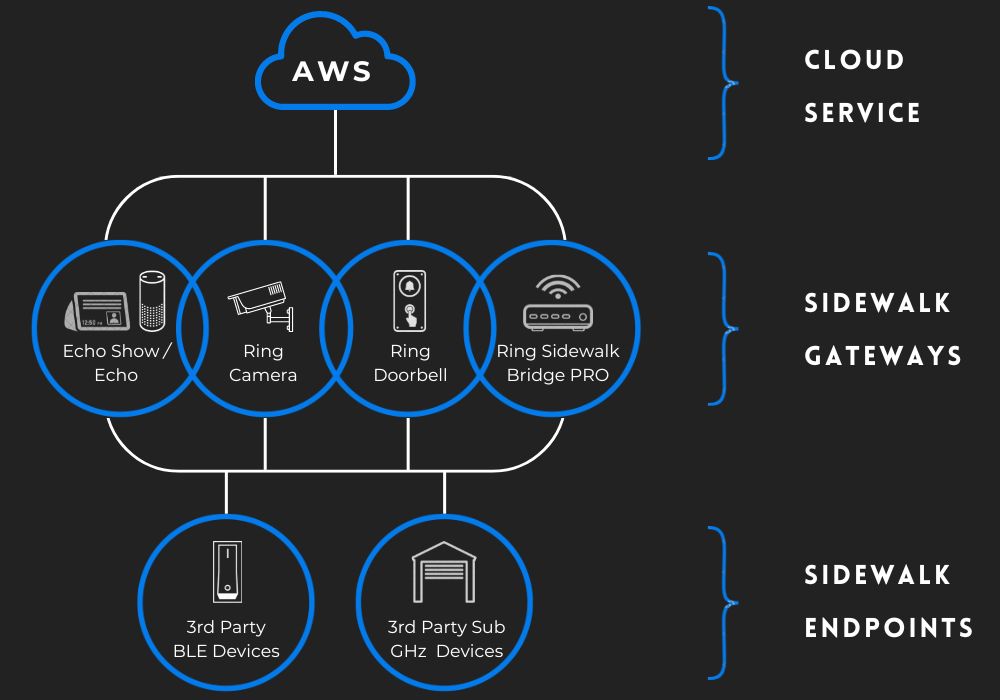
The Sidewalk gateway (also known as the Sidewalk bridge) is responsible for routing packets to and from distributed network devices and the Sidewalk network server. The Sidewalk network server is managed by Amazon. It should be noted that a Sidewalk Bridge has no access to the application data that has been sent or received by the endpoints, since the data is encrypted at network and application level.
Terminals (Sidewalk compatible devices) are low bandwidth/low power intelligent products such as leak detectors, door locks and lights. All terminals must first be registered in order to communicate on the Sidewalk network, which requires keys defined at the time the terminal is manufactured. Amazon calls the registration method "Frustration Free Setup" (FFS) because it allows a device to register on the network without any action from the user. This process is called "Touchless Registration". To register your terminal using Touchless Registration, ensure that your gateway is Sidewalk compatible and that your terminal is operational; registration should begin automatically.
Please note that Sidewalk endpoints do not connect to the Internet themselves. They rely on the Sidewalk bridge to access Sidewalk.
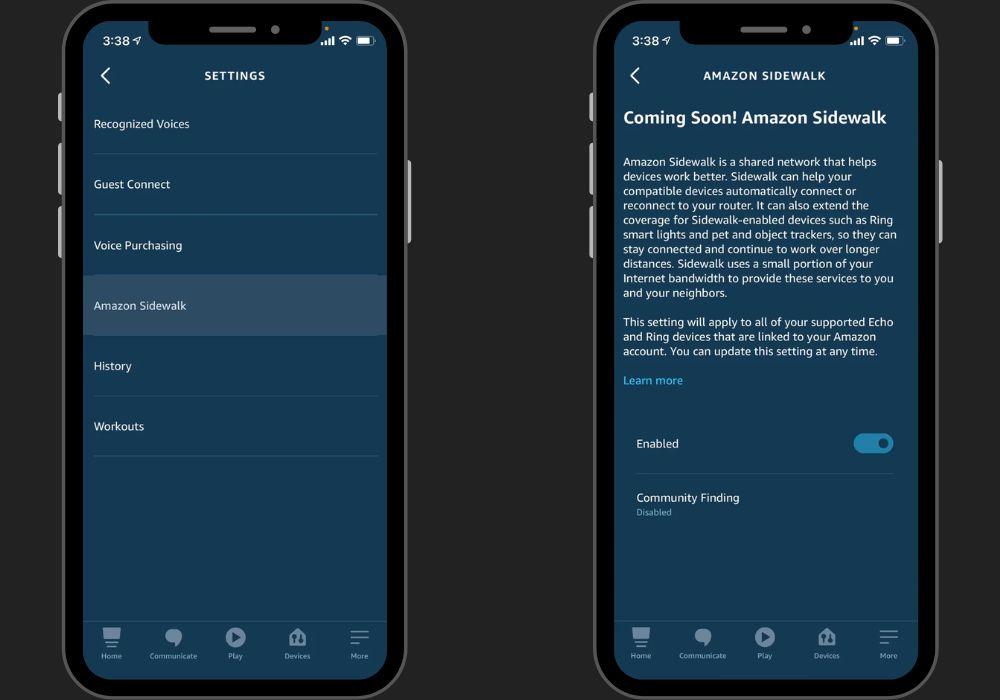
To enable Sidewalk on your supported echo show / echo devices :
- Launch the Alexa app on your mobile device.
- Choose the option "Settings" under the "More" tab.
- Choose "Account Settings".
- Choose "Amazon Sidewalk" and click "Enable".
Amazon Sidewalk is the future of shared networks. As the number of participating bridges increases, the network becomes even stronger and wider.
Thank you note !
I want to personally thank you for reading my article. Your time and attention are greatly appreciated, and it means a lot to me that you took the time to engage with my content.
Your support and feedback are invaluable, and I am grateful for the opportunity to share my thoughts and ideas with you. Whether you left a comment, shared the article, or read it, your participation helps fuel my passion for writing and motivates me to keep creating content that resonates with readers like you.
Please feel free to reach out if you have any thoughts, questions, or feedback about the article. I love hearing from my readers and learning about your perspectives.
Once again, thank you for your support. I look forward to sharing more with you soon.